Showing posts with label Tutorial. Show all posts

Thursday, 23 June 2016

Tutorial Thursdays - Blogger Part 1: Making your First Post

For today's Tutorial Thursday I am going to be a breakdown on how to quickly post your first post on a Blogger driven blog.

This tutorial will continue after the break, for the sake of the feeds that Free*Style is published on.
.
If you are still interested, please click on through.

Thursday, 7 April 2016

Tutorial Thursdays - Photoshop: Making it Rain

For today's Tutorial Thursday I am going to be showing you a semi quick way to make any shot in sl look like it is raining. This is a Tutorial for Photoshop, so you require that system in order to do this technique.

.
.
This tutorial will continue after the break, for the sake of the feeds that Free*Style is published on.
.
If you are still interested, please click on through.
.

Thursday, 18 February 2016

Tutorial Thursdays - Creating your own Spotlight Projectors

This week on Tutorial Thursday, I am going to be doing a little something something with Projectors. It has been often requested, when topics for tutorials have come up, so it was about time I have done something with these projectors for you all.

For this tutorial I am using Ultra, and am on the most current version of Firestorm Viewer, that is out at date of this post.


I also decided to be a frog for this tutorial, haha, so enjoy! This avatar was created by Wilds of Organica. There are a few types of other critters on their SL Marketplace HERE, or you can take a chance at their gacha machines at the Mainstore HERE. You can also find various ones at yardsales, that is how I completed some of my series. The Gachas are only L$100 to play, and you get the complete avi with some customization options as well as an AO.

This tutorial will continue after the break, for the sake of the feeds that Free*Style is published on.


.
If you are still interested, please click on through.


Saturday, 12 December 2015

My First Video!

  Hi all!  I put together a look with almost all freebies/cheapies and was going to just put it up here like a normal post.  Well, last night my daughter was bugging me to find a way to make a video of her drawing pictures of foxes (she's obsessed with foxes, lol.)  I asked Plurk and they gave me some ideas and I finally found one.  When I went to edit this photo I decided, hey, why not record it?  So here is the picture and below is me editing it.  I didn't do a ton of editing and the video is long and kind of pointless but I am excited to learn to make videos so I had to share. :)  Enjoy!
WORN:
Skin: 7 Deadly Skins, Marketplace hunt gift
Hair: Exxess, 1L
Earrings and Piercing: Mons, group calendar gifts
Eyes: InkHeart, 1L limited time
Eyeliner: Adore&Abhor
The website I used to record the video is HERE.  I know nothing about this website so I very much hope it's not like some creepy virus thing or something. -.-
The main program I used for editing the picture is Gimp, which is HERE, and the second program you see me using is Photoscape, which is HERE.

Thursday, 10 September 2015

Tutorial Thursdays - Utilizing the Free*Style Monday Morning Pinterest Board

Today on Tutorial Thusdays, we are going to be doing a super quick tutorial on Pinterest. I have been getting a few messages, of people not understanding our Monday Morning Pinterest Board feature, so wanted to clear a few things up for you all.

I am placing a cut here, for the sake of the feeds that Free*Style is on, as tutorials always get sort of picture heavy.

If you would like to learn more, please continue on through the cut.
.

Friday, 4 September 2015

Tutorial Thursdays - Gacha Minion - Part 4 - Friendly Selling

Today we will be continuing our ongoing series of tutorials based on Gacha Minion. I decided to show you a little technique I use, when I am able, to keep my Boxes more friendly, not only to those who actually use Gacha Minion, but also those who do not. You never know who might happen upon your little yardsale, and this is something simple you can do to make looking at your resells a bit easier.


Find out more information about Gacha Minion at your own pace at these Various Links:


I am placing a cut here, for the feeds that pick up from the Free*Style Blog, as tutorials always get a bit picture happy.

If you would like to learn more, please continue on, through the cut
.  


Thursday, 13 August 2015

Tutorial Thursdays - Blogger Editing Tools - Picmonkey: Part 2 - Underwater Shots

For today's Tutorial Thursday I am going to be showing you more of PicMonkey, a fun browser site, that allows you to do some quick editing, without having to download anything onto your computer.

I did Part 1 a few weeks back, so if you aren't use to the site, please read on through the first part HERE. 

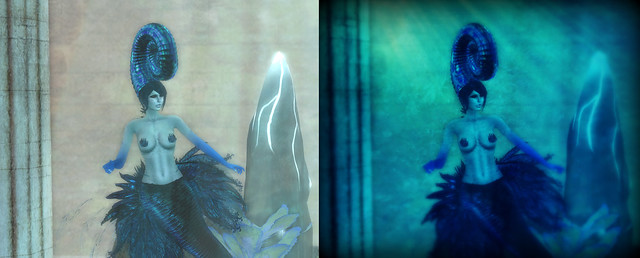
With Fantasy Gacha Carnival just opening, and Enchantment opening tomorrow, I will be doing a lot of underwater shots, as these events have a lot of Mer related items. I did this underwater picture the other day, and thought it might be a good secondary tutorial for PicMonkey, to follow up the previous one.


Whorl - Before&After

I don't play around with my blog shots too often, I am not that sort of blogger. I only have so much time between all of what I do in a sl, so I have always just taken the best inworld environmental shots I can. 

One thing tho, is it is not exactly easy to take pictures the sl waters, and make them look like they are really underwater. Not unless the sim has some special decorations, like Light Beams or Ripple Emitters.

PicMonkey can help you with this, in a quick simple way. The above shots was edited in PicMonkey, the Left being the inworld shot, the Right being my edited in PicMonkey shot.

This tutorial will continue after the break, for the sake of the feeds that Free*Style is published on.
.
If you are still interested, please click on through. 
 .

Thursday, 23 July 2015

Tutorial Thursdays - The Art of Freebie Hunting - Part 1

This week on Tutorial Thursdays I took a suggestion from a fellow blogger, Deoridhe Quandry, on showcasing how I freebie hunt and then organize the results. Now, this will be part tutorial, part guide of sorts, as there are many ways to do this, and a lot of resources out there for people doing the exact same thing.

I have been blogging on Free*Style for over 7 years now. I didn't start out as a blogger here, but as a inworld freebie finder for the Free*Style group, when we still had one. I eventually was brought on as a Guest Designer Blogger, and now actually Co-Own the blog, along side Sileny Noel.

Free*Style was my first introduction to Blogging. So right off the get go, most of my folders in my inventory became related to Freebies.

The way I started, in the beginning, for posts, was to do them by theme. I would go off one word, and try to find a whole bunch of stuff, then figure out if I could make it work. It would be something like zombie, duck, orange, water, you get the idea.

This made my posts more interesting and different. Everyone has their own style, but sometimes there is only so much you can do with a single item. Seeing said item 20 times in one week can get annoying, if you are a reader that follows many blogs and feeds. I have always tried to stay away from this. I will even blog things months later, on purpose, if they are still out. 

Free*Style has never been about blogging all the things first, but more of a supportive blog, to our group of designers, as well as a group of fun bloggers. We strive to bring you guys a bit of joy, and silliness, when we can.

For the sake of the Feeds which Free*Style is on, the Tutorial continues after the break

Thursday, 16 July 2015

Tutorial Thursdays - Blogger Editing Tools - Picmonkey: Part 1 - Quick Photo Processing

I have had so many suggestions for tutorials, I want to thank all those who have contacted me inworld, formally on here. Thanks for your positive comments, and your interest in keeping this project of mine going.

For today's Tutorial Thursday I am going to be showing you Picmonkey, a fun browser site, that allows you to do some quick editing, without having to download anything onto your computer.

There is no requirement to sign up to the site to use it, though there are premium abilities with a paid account. All these special features are clearly marked when browsing the different menus on the site.

I am mainly a Photoshop user, but when I blog on my other avatars, I like to be able to do it quickly, in most cases, as blogging on 3 separate avatars, on 3 separate sites, can get a little crazy at times. I use Picmonkey for my two other avatars. 

I will be doing a continuing series on Picmonkey, but today I thought I'd show you a quick way to get a decent photo processed using the site. This could be good if you are a blogger starting out and have no post processing software, or just want to update your inworld profile picture.

The lovely LadyLight Koolhoven was my model for this shot today, which I will be editing with during the course of this tutorial. This shot is a raw taken inworld, in the windlight of her choice.


This tutorial will continue after the break, for the sake of the feeds that Free*style is published on.

If you are still interested, please click on through.

Thursday, 11 June 2015

Tutorial Thursday - A Blogger's How-To for organizing Event Coverage

I have been wanting to do this Tutorial for a while now, and even saved one of my event folders, just for this purpose.

I often hear, from blogger friends, my own store's bloggers, as well as other people I admire in the community, that inventory organization is a problem, and more so when dealing with big events.

Now think about this from my perspective. I am not only a blogger, but am also a designer. So my inventory is basically double what any sane blogger probably has.

I am not going to be talking today about organizing your inventory as a whole, but how to keep your Event Coverage organized.

In today's example I will be using the folder I created for Skin Fair 2015.

Keep in mind, this is just the way I personally do things. I am not trying to tell anyone my way is the best way. This is more a guide of those of you who don't have a current system in place.


For the sake of the Feeds that Free*Style is on, I will be placing a cut here. If you are interested in this topic, feel free to hit the link to continue reading.

Thursday, 4 June 2015

Tutorial Thursdays - Gacha Minion - Part 3 - The Boxes

Today we will be continuing our ongoing series of tutorials based on Gacha Minion. Now, I had planned to do something different for this week's tutorial, but with The Arcade just opening, I thought this was more appropriate, since I had to learn about the Sell List-o-matics myself rather recently.


Find out more information about Gacha Minion at your own pace at these Various Links:


I am placing a cut here, for the feeds that pick up from the Free*Style Blog, as tutorials always get a bit picture happy.

If you would like to learn more, please continue on, through the cut
.  


Thursday, 28 May 2015

Tutorial Thrusday - Anypose Expression Hud

Today I thought I'd talk about something I feel all avatars should have.


Anypose Expression Hud is something everyone should own, if they take photos of themselves often. I use it a lot as a designer, as well as a blogger. Casual Photographers should have this too, if you take a lot of profile pics of yourself, or lots with loved ones.

This hud is very  simple to use, Facial Expression are to the left, going down. When you select an expression, a little X will appear in the box beside it. This way you know what you have activated. With the expansion of many mesh bodies on the market, I don't use the hand positioning anymore, but there might still be those of you who find it useful. I use to use the fist a lot, for holding things, like swords.


Hud when it is closed on your screen. It is very small. I normally position it to my top left of the screen. It isn't distracting at all.

At the very top are a few buttons that help with resizing and closing the hud. The X button will actually detach it from you.


More photos and tutorial continuation after the break.

Wednesday, 18 March 2015

Tutorial - Gacha Minion - Part 2 - Search & Lists

Today will be continuing from where I left off with the previous Tutorial - Gacha Minion - Part 1 - How to get Started.


Find out more information about Gacha Minion at your own pace at these Various Links:


BIG NOTICE

Until April 10th, Gacha Minion has pro accounts available for free, all you need to do is go to the Kiosk and Click the Pro Account Button. Then proceed through the process.

I am placing a cut here, for the feeds that pick up from the Free*Style Blog, as tutorials always get a bit picture happy.

If you would like to learn more, please continue on, through the cut.

Monday, 9 March 2015

Update - The next Gacha Minion Tutorial

Hey guys, since I have received a few notecards, I just wanted to let everyone know that the second part is being worked on.

It will obviously be late, as it is no longer the weekend.

I, as well as my RL lil ones, are all sick, so I haven't had as much time to dedicate to it. I will be getting it up, you just got to wait a little bit. Tutorials always take more time than fashion blogging.

Also, an update to the System itself, Gacha Minion now supports older gacha event items, or gacha items that are only sold instore, so were never at an event. This was something I know I desperately wanted, so I hope it makes others happy too.


Friday, 20 June 2014

Do Your Boobs Wiggle and Jiggle And Not Fit Your Clothes?

 OK, mine do in RL but that isn't what I am talking about.  LOL.  What I am talking about is the new fit mesh boobs out there,  and it can indeed be hard to get your applier clothing to work with it.  If this is your problem then I suggest you check out Magenta Devinna's blog HERE which will explain to you how to fit them properly.
  Why am I posting this on a freebie blog?  Because I know lots of you are buying the fit mesh Lolas now and there are so, so many free options for applier clothing and many of you will get very frustrated trying to get them to look right with the new boobs.  Plus, I love tutorials!!!
  If you ever want to help out with posting tutorials let me know and I will get you involved right here.  or if you do tutorials on your own blog and want me to link it let me know and I will think about starting a new page up top with all the ones we find.
  Thanks for reading and good luck with your jiggly boobies!