Showing posts with label Tutorial Thursday. Show all posts

Thursday, 23 June 2016

Tutorial Thursdays - Blogger Part 1: Making your First Post

For today's Tutorial Thursday I am going to be a breakdown on how to quickly post your first post on a Blogger driven blog.

This tutorial will continue after the break, for the sake of the feeds that Free*Style is published on.
.
If you are still interested, please click on through.

Thursday, 7 April 2016

Tutorial Thursdays - Photoshop: Making it Rain

For today's Tutorial Thursday I am going to be showing you a semi quick way to make any shot in sl look like it is raining. This is a Tutorial for Photoshop, so you require that system in order to do this technique.

.
.
This tutorial will continue after the break, for the sake of the feeds that Free*Style is published on.
.
If you are still interested, please click on through.
.

Thursday, 18 February 2016

Tutorial Thursdays - Creating your own Spotlight Projectors

This week on Tutorial Thursday, I am going to be doing a little something something with Projectors. It has been often requested, when topics for tutorials have come up, so it was about time I have done something with these projectors for you all.

For this tutorial I am using Ultra, and am on the most current version of Firestorm Viewer, that is out at date of this post.


I also decided to be a frog for this tutorial, haha, so enjoy! This avatar was created by Wilds of Organica. There are a few types of other critters on their SL Marketplace HERE, or you can take a chance at their gacha machines at the Mainstore HERE. You can also find various ones at yardsales, that is how I completed some of my series. The Gachas are only L$100 to play, and you get the complete avi with some customization options as well as an AO.

This tutorial will continue after the break, for the sake of the feeds that Free*Style is published on.


.
If you are still interested, please click on through.


Thursday, 13 August 2015

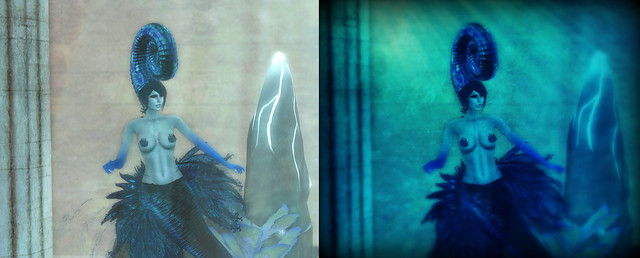
Tutorial Thursdays - Blogger Editing Tools - Picmonkey: Part 2 - Underwater Shots

For today's Tutorial Thursday I am going to be showing you more of PicMonkey, a fun browser site, that allows you to do some quick editing, without having to download anything onto your computer.

I did Part 1 a few weeks back, so if you aren't use to the site, please read on through the first part HERE

With Fantasy Gacha Carnival just opening, and Enchantment opening tomorrow, I will be doing a lot of underwater shots, as these events have a lot of Mer related items. I did this underwater picture the other day, and thought it might be a good secondary tutorial for PicMonkey, to follow up the previous one.


Whorl - Before&After

I don't play around with my blog shots too often, I am not that sort of blogger. I only have so much time between all of what I do in a sl, so I have always just taken the best inworld environmental shots I can. 

One thing tho, is it is not exactly easy to take pictures the sl waters, and make them look like they are really underwater. Not unless the sim has some special decorations, like Light Beams or Ripple Emitters.

PicMonkey can help you with this, in a quick simple way. The above shots was edited in PicMonkey, the Left being the inworld shot, the Right being my edited in PicMonkey shot.

This tutorial will continue after the break, for the sake of the feeds that Free*Style is published on.
.
If you are still interested, please click on through. 
 .

Thursday, 23 July 2015

Tutorial Thursdays - The Art of Freebie Hunting - Part 1

This week on Tutorial Thursdays I took a suggestion from a fellow blogger, Deoridhe Quandry, on showcasing how I freebie hunt and then organize the results. Now, this will be part tutorial, part guide of sorts, as there are many ways to do this, and a lot of resources out there for people doing the exact same thing.

I have been blogging on Free*Style for over 7 years now. I didn't start out as a blogger here, but as a inworld freebie finder for the Free*Style group, when we still had one. I eventually was brought on as a Guest Designer Blogger, and now actually Co-Own the blog, along side Sileny Noel.

Free*Style was my first introduction to Blogging. So right off the get go, most of my folders in my inventory became related to Freebies.

The way I started, in the beginning, for posts, was to do them by theme. I would go off one word, and try to find a whole bunch of stuff, then figure out if I could make it work. It would be something like zombie, duck, orange, water, you get the idea.

This made my posts more interesting and different. Everyone has their own style, but sometimes there is only so much you can do with a single item. Seeing said item 20 times in one week can get annoying, if you are a reader that follows many blogs and feeds. I have always tried to stay away from this. I will even blog things months later, on purpose, if they are still out. 

Free*Style has never been about blogging all the things first, but more of a supportive blog, to our group of designers, as well as a group of fun bloggers. We strive to bring you guys a bit of joy, and silliness, when we can.

For the sake of the Feeds which Free*Style is on, the Tutorial continues after the break

Thursday, 16 July 2015

Tutorial Thursdays - Blogger Editing Tools - Picmonkey: Part 1 - Quick Photo Processing

I have had so many suggestions for tutorials, I want to thank all those who have contacted me inworld, formally on here. Thanks for your positive comments, and your interest in keeping this project of mine going.

For today's Tutorial Thursday I am going to be showing you Picmonkey, a fun browser site, that allows you to do some quick editing, without having to download anything onto your computer.

There is no requirement to sign up to the site to use it, though there are premium abilities with a paid account. All these special features are clearly marked when browsing the different menus on the site.

I am mainly a Photoshop user, but when I blog on my other avatars, I like to be able to do it quickly, in most cases, as blogging on 3 separate avatars, on 3 separate sites, can get a little crazy at times. I use Picmonkey for my two other avatars. 

I will be doing a continuing series on Picmonkey, but today I thought I'd show you a quick way to get a decent photo processed using the site. This could be good if you are a blogger starting out and have no post processing software, or just want to update your inworld profile picture.

The lovely LadyLight Koolhoven was my model for this shot today, which I will be editing with during the course of this tutorial. This shot is a raw taken inworld, in the windlight of her choice.


This tutorial will continue after the break, for the sake of the feeds that Free*style is published on.

If you are still interested, please click on through.